AI Agent Builder for Production — introducing London System Agent
London System Agent is an AI agent builder focused on production readiness: describe the agent you want, compile it into an auditable graph, then inspect execution traces, cost, evaluation results, and API execution from the same workspace.
In one line
Natural-language requirement → explicit agent graph (IR) → simulation → evaluation/gates → API execution. The whole thread lives in one studio.
Because an agent is a structure of input, model, tool, eval, and loop nodes — not a long prompt — you can trace what ran and why.
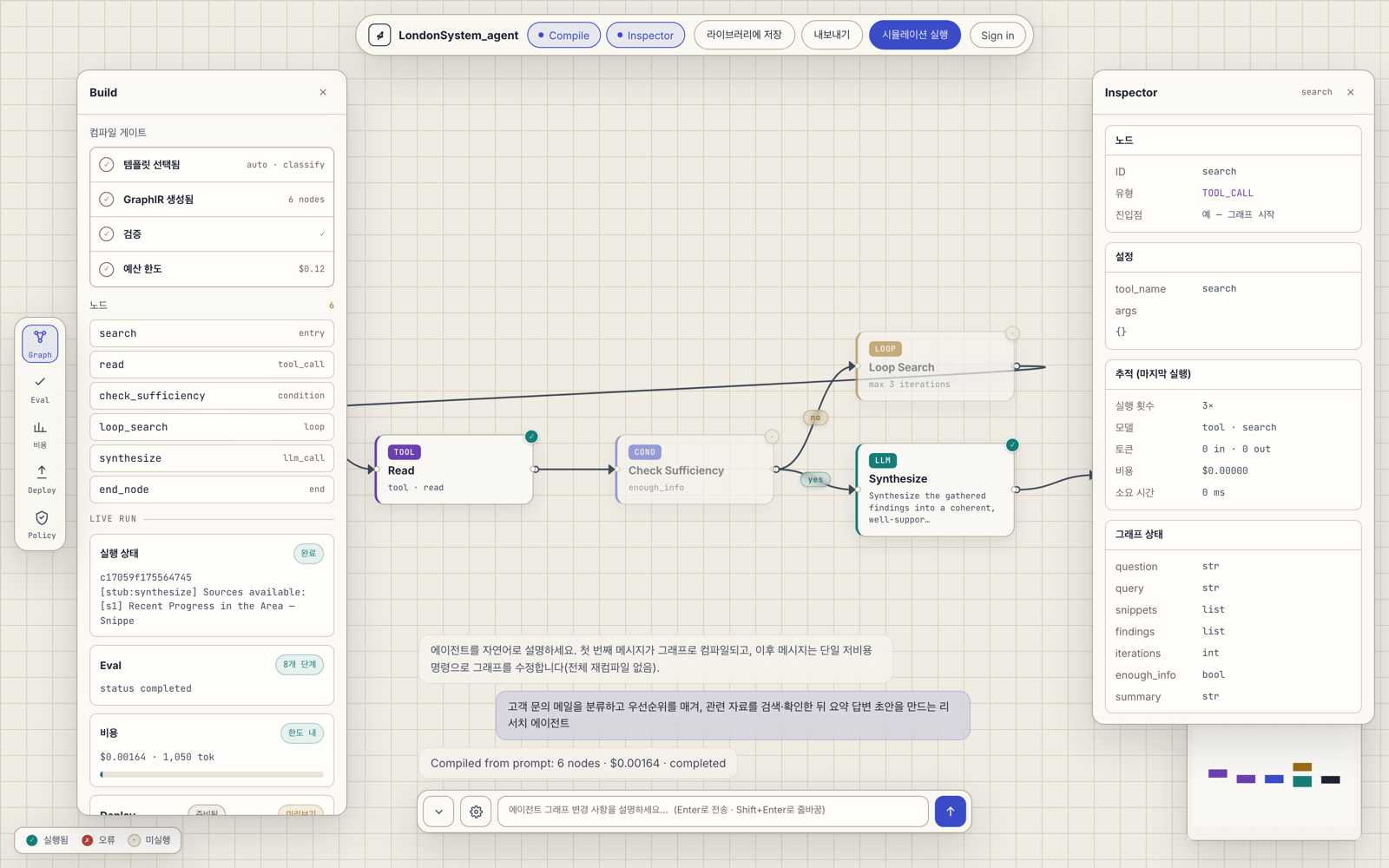
Below is a single-sentence requirement compiled in the London System Agent studio. Search, read, condition, loop, and synthesis nodes are generated as a graph, then executed — with per-step cost and a completed status shown alongside.
What it does differently
Production readiness: after compilation, the system checks basic graph structure and later records node-level run state and cost.
Cost control: Stub mode validates structure without live LLM calls; Real mode runs with configured provider credentials plus prepaid credits and budget caps.
Evaluation and gates: template-backed golden datasets and policy gates separate “it runs” from “it meets quality and policy criteria.”
API execution: signed-in users can issue platform API keys and call saved agents through /v1/runs. The current Deployment blocked banner for gate failures is an honest visualization, not hard enforcement.
Who it's for
It's for people past the quick prompt-and-see stage — who need to explain why an agent behaves as it does and manage its cost and quality.
It fits production agents where reproducibility and auditability matter.
Getting started
Open the Studio and describe the agent you want in a single sentence. The first message compiles into a graph; later chat refinements send the current IR plus one new instruction and create a refined IR as a new run. The original run stays preserved for audit and replay.
Your turn to build
Compile your first agent graph from a single sentence.